Category: ColdFusion

  • Dynamic Form Templates with CFInclude

    Dynamic Form Templates with CFInclude

    ColdFusion is a pretty powerful language when it comes to managing all your server / enterprise resources, but it is also useful to manipulate user interfaces.

    In this post, we speak about using the CFInclude tag to build intuitive user experiences.

    To start with, here is our problem. We had multiple pages in a website, and all of them were used to capture data. The issue was, none of the fields captured were finite. We had to capture (into a database) fields that were different across forms. Creating a table for each form was impractical – so it had to be into a single table. To reframe in a more technical wording, the problem is to insert key value pairs from multiple web forms, into a common database. A fairly simple problem, but the expectation was also to ensure a good user-experience. Here’s an illustration of how we went about solving it.

    (more…)
  • ColdFusion API Manager at CFSummit 2018

    ColdFusion API Manager at CFSummit 2018

    At CFSummit 2018, I presented on how APIs are redefining how software is built today, and how the ColdFusion API Manager helps you with your API deployments and management.

    The session spoke about, why the APIs are the need of the hour in any enterprise environment that deals with large amounts of data, and are a necessity for communication across different technology stacks. But building applications that serve and consume APIs are only one part of the equation. Administering, maintaining and securing your APIs define the impact brought about by the API you built. The session demonstrated how one of the most simple, but the most performant API Managers out there, ColdFusion API Manager, improves your end-to-end API distribution workflows. The session also gave insights into configurations of API Manager that help you author more control over access to your APIs. Insights included on real-world use-cases on how organizations are already using ColdFusion API Manager in production to streamline information flow internally.

    Here’s the recording!

  • ColdFusion 2018 – Improvements on Arrays and Strings

    ColdFusion 2018 – Improvements on Arrays and Strings

    ColdFusion 2018 includes a host of new enhancements on Language. Language improvements have been considered based on use-cases that make more sense in today’s world, and while also taking into consideration all the bugs and enhancements logged by the community.

    Significant enhancements are Null Support – with ColdFusion now Null aware, working alongside other technologies such as JavaScript has become a whole lot easier. ColdFusion now preserves the date-type of your variables, and does away with the “guessing”. What this means is, ColdFusion does a better job primarily while interfacing with databases and while serializing / deserializing data.

    (more…)

  • Language improvements in ColdFusion 2018 at Adobe Immerse ’18

    Language improvements in ColdFusion 2018 at Adobe Immerse ’18

    Get insights into the language improvements in ColdFusion 2018, at the Adobe Immerse Webinar on June 12, 2018. I will be speaking about Null Support, Final variables, Abstract Methods, Data Type Preservation, Asynchronous Programming Constructs, and a host of improvements on Array.

    Here’s the session abstract.
    Learn how ColdFusion 2018’s new asynchronous programming constructs allow you to offload resource or I/O intensive functionalities in your application to improve performance. ColdFusion 2018 includes NULL support which makes it convenient to work with other technologies, when accepting or sending data to client side from ColdFusion. New features include default functions on interfaces and covariant return types. Join this session to walk through CFML code running on the latest ColdFusion 2018.

    Schedule sessions at the Adobe Immerse Site,
    https://immerse18.adobe-devs.adobeevents.com/sessions/

  • Exposing SOAP webservices through ColdFusion 2016 API Manager

    Exposing SOAP webservices through ColdFusion 2016 API Manager

    The latest version of ColdFusion bundled in an API Manager, allowing you to moderate publishing and access of your APIs. The API Manager acts as a proxy to existing REST and SOAP web-services.

    Just wrapped up an article on Adobe DevNet that speaks about exposing existing SOAP based web services. Have a look at the DevNet Article.

    Browse through the newest features available with the latest release of ColdFusion 2016 and ColdFusion API Manager 2016,
    http://www.adobe.com/devnet/coldfusion/article-index.html

  • ColdFusion WSConfig configuration backups

    ColdFusion 11 update 5 helps address a issue with connector reconfigurations, that could potentially leave you in the lurch. The update includes a workflow to backup your custom configurations while un-configuring ColdFusion from an IIS site or an Apache instance.

    Here’s a little more detailing about what the workflow does.

    On unconfiguring the connector on IIS, a directory backup gets created under the /CF/config/wsconfig directory, and houses directories which go by the names “1-1“, “1-2“, “2-1“, etc. Though these directories sound too cryptic, its easy to figure out what it stands for. You can consider the naming convention to be of the form <ORIGINAL CONFIGURATION DIRECTORY MAGIC NUMBER>-<INCREMENTAL NUMBER>. The incremental number exists to ensure older unconfigurations do not get overwritten.

    On unconfiguring the connector on Apache, everything said of the IIS hold true. Additionally, mod_jk.conf is also backed up. The mod_jk.conf file is created by ColdFusion, and tied to Apache’s httpd.conf when the connector is configured. The said configuration file houses mappings to connector files, CF specific handler mappings and virtual directories.

    And that, we hope, saves you from frustrations of re-tuning you connector configurations!

  • ColdFusion 11 Hotfix 5 and ColdFusion 10 Hotfix 16 are out!

    Hotfix 5 for ColdFusion 11, and Hotfix 16 for ColdFusion 10 are out, and fix close to 150 bugs collectively!

    Connector fixes for IIS are available for ColdFusion 11, and that would imply the need to reconfigure connectors if you are on a ColdFusion 11 configured with IIS. ColdFusion 11 also packs Apache 2.4.10 support. However, you would not need to reconfigure Apache connectors unless Apache 2.4.10 support is required.
    No connector reconfigurations are required for ColdFusion 10.

    Find the technotes below,
    ColdFusion 11 Update 5: https://helpx.adobe.com/coldfusion/kb/coldfusion-11-update-5.html
    ColdFusion 10 Update 6: https://helpx.adobe.com/coldfusion/kb/coldfusion-10-update-16.html

    More details are seen on the ColdFusion Blog.

    Appreciate your feedback!

  • ColdFusion 11 Hotfix 3 – Early Access

    Hotfix 3 for ColdFusion 11 is out for early access, with a long list of fixed bugs. Early access / public preview for ColdFusion releases was a request we received at CFSummit, and here they are!

    View the list of Issues Fixed
    Read the Release Notes

    Instructions to apply the hotfix are available here.

    Appreciate your feedback!

  • ColdFusion and Nginx

    Nginx is that popular webserver that’s been increasingly eating up the webserver market share. Wikipedia says over 30% of the top 100K sites run on Nginx. The Nginx wiki speaks of the webserver as a high-performance HTTP server and reverse proxy, as well as an IMAP/POP3 proxy server.

    The most striking feature of Nginx though, is that it adopts a non-blocking, event driven architecture to serve requests. Unlike Apache or IIS, which spawn a new process (or worker) or thread to handle new requests, Nginx is single-threaded and new connections are placed within an event loop, with requests processed asynchronously. This provisions memory and CPU usages to be consistent, irrespective of the number of connections. Simultaneous connections on Apache and IIS on the other hand, would incrementally hog resources, upping the memory footprint. Wikipedia notes Nginx to use ~2.5 MB memory per 10k inactive HTTP keep-alive connections.

    Now, to make sense of all this in ColdFusion’s context, let’s see how Nginx works with ColdFusion.
    This post walks you through two aspects,

    1. Configuring Nginx to serve ColdFusion requests
    2. Using Nginx as a load balancer between CF instances


    Configure Nginx to serve ColdFusion requests

    Now, there are two ways (you will figure out there are actually three ways) to get ColdFusion configured with Nginx – with the AJP protocol as done for Apache or IIS, or using Nginx as a reverse proxy to ColdFusion.

    Through the AJP Protocol
    Nginx speaks only HTTP, FastCGI, SCGI, uWSGI and MemCache – hence, no native support for AJP. We will use a third party AJP module to connect to ColdFusion.

    Configuring ColdFusion with Nginx over AJP comes with limitations. A modified Tomcat Connector is used while configuring through the ColdFusion Connector, and things could go haywire, to an extent that something as simple as CGI variables could break!
    The AJP Module is also not listed in on nginx.org, though Nginx maintains the list is community updated.
    That leaves us with the option of reverse proxy.

    As a Reverse Proxy
    Configuring a reverse proxy is extremely simple. Directive’s for a reverse proxy to Apache are already in place in the vanilla configuration file. All you need to do is edit it!
    Here’s a configuration file for an Nginx server running on port 85, and a ColdFusion server running on port 8501.

    #user  nobody;
    worker_processes  1;
    events {
        worker_connections  1024;
    }
    http {
        include       mime.types;
        default_type  application/octet-stream;
        sendfile        on;
        #tcp_nopush     on;
        keepalive_timeout  65;
        #gzip  on;
        server {
            listen       85;
            server_name  localhost;
            #charset koi8-r;
            #access_log  logs/host.access.log  main;
            location / {
                root   html;
                index  index.html index.htm index.cfm;
            }
            #error_page  404              /404.html;
            # redirect server error pages to the static page /50x.html
            #
            error_page   500 502 503 504  /50x.html;
            location = /50x.html {
                root   html;
            }
            # proxy the CFC, CFM scripts to ColdFusion listening on 127.0.0.1:8501
            #
            location ~ \.cfm$ {
                proxy_pass   http://127.0.0.1:8501;
            }
            location ~ \.cfc$ {
                proxy_pass   http://127.0.0.1:8501;
            }
        }
    }
    

    The complete configuration file can be downloaded from, https://bitbucket.org/immanuelnoel/coldfusion-nginx-proxy

    A handful of limitations exist here too.

    1. Since the connector does not come into play, ColdFusion is unable to process CFM / CFC files that exist within the Nginx webroot
    2. SES URLs – again introduced by ColdFusion connector, are not available
    3. CGI variable for server port shows up ColdFusion port

    Another way to reverse proxy
    To have absolute support for ColdFusion, while also extracting Nginx’s powerful static file handling, you might have to configure Nginx as a reverse proxy to Apache, and have ColdFusion configured with Apache. Having Nginx frontend Apache, is a common use-case, especially when the requirement is to absolutely use Apache (for things like directory level configurations – Nginx has nothing on the lines of .htaccess), while also benefiting from Nginx’s serviceability. The idea here, is to have static resources served by Nginx, with Nginx forwarding requests it doesn’t understand to Apache, and eventually, Apache ends up serving only ColdFusion requests.

    Before you start to contemplate whether or not this is good, let’s look at some numbers.
    I ran a quick test for the request roundtrip for 1000 requests in the below scenarios. In the first case, a CF script that dumps CGI variables was used, and in the second, a CFM that loads a large image, dumps now(), and dumps CGI variables was used.

    Request Flow cfdump(CGI) (seconds) image, now(), cfdump(CGI) (seconds)
    Client -> ColdFusion 57.395676 43.312573
    Client -> Nginx -> ColdFusion 42.997750 40.502565
    Client -> Apache -> ColdFusion 50.277571 41.127564
    Client -> Nginx -> Apache -> ColdFusion 46.539902 45.562761

    Now, take a call whether or not the last line affects you. If not, the only change you would need to do to the above configuration file, is swap 8501 with 80 (Assuming Apache is running on 80), and configure Apache with ColdFusion.


    That’s it! Now, if one of you have Nginx in production, do share your experiences about how it fares in comparison to Apache.

  • Busting the HTTP Error 500.19 on ColdFusion 11 + IIS

    Here’s a little trouble shooting tip to bust an IIS HTTP Error 500.19 (Internal Server Error) that may pop up when IIS is configured with ColdFusion 11. The error mostly occurs when IIS is unable to interpret configurations specified in the web.config file.

    In this post I speak about fixing a specific cause of a 500.19, while the ideology can be applied to fix similar errors.

    When a connector is configured with IIS, ColdFusion attempts to register required MimeTypes in IIS. MimeTypes are registered to the server, or to specific site based on the options selected during connector configuration. Now, there is a good possibility some of these MimeTypes may be already added by other third party applications. Now what happens is a debacle. ColdFusion attempts to register a MimeType, and IIS puts this into a web.config file, and since this entry is actually a duplicate, IIS fails to serve any pages off the affected sites, and throws a 500.19.

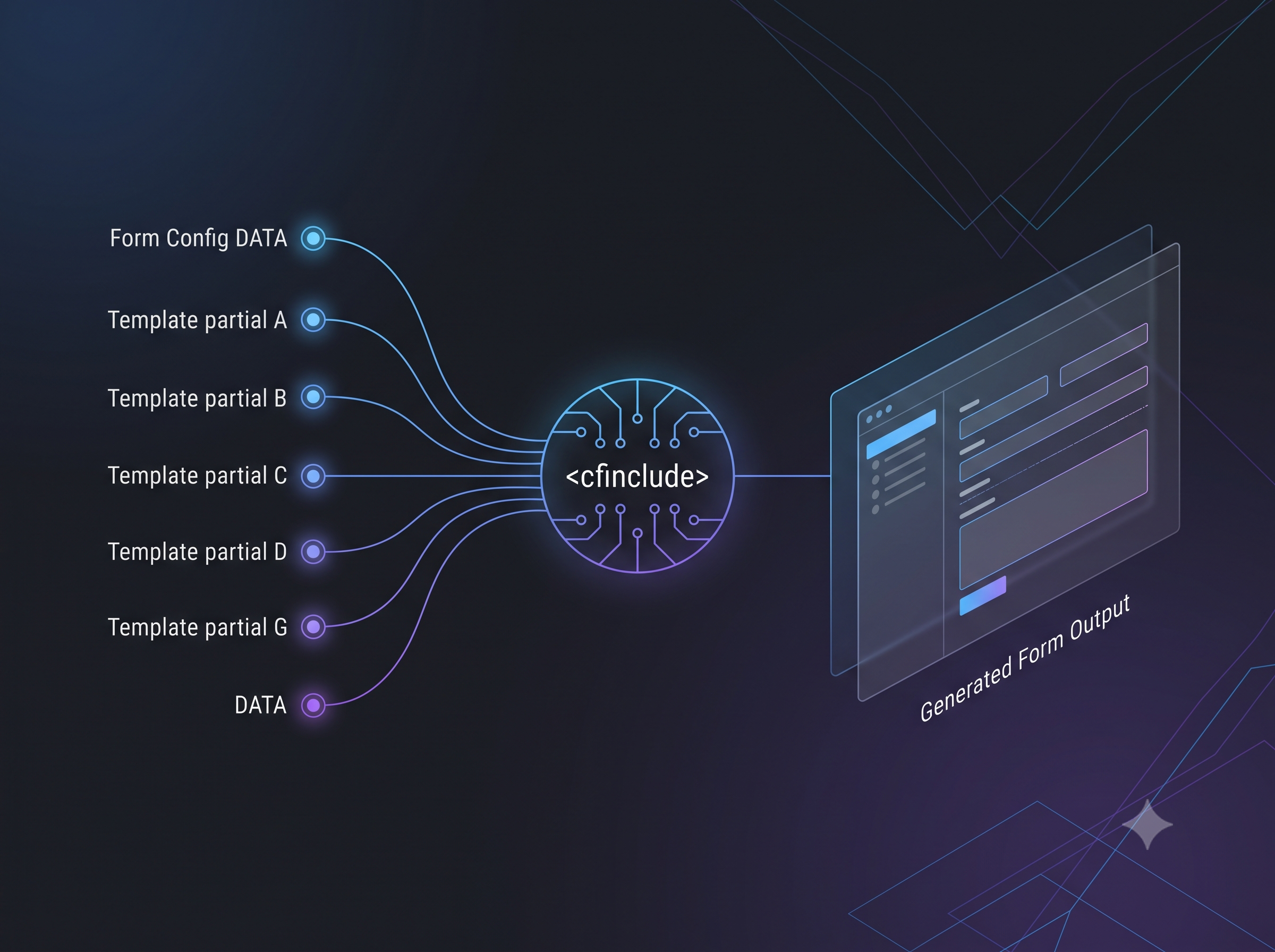
    Here is one such error. The duplicate MimeType added in this case, is .air
    MimeError

    All we need to do to get around this error, is to either unconfigure the connector, navigate to IIS Manager > Site in Consideration > MimeTypes, remove the entry that references .air extension, and reconfigure the connector, OR, If you are confident enough to play around with you server, the web.config file itself can be edited to reflect appropriate settings.

    While that should get rid of the 500.19, this particular issue is being tracked, and will be resolved in a future release of ColdFusion.