Blog

  • Toast on AIR for Android

    Here’s a component which behaves as a ‘Toast’ for AIR applications running on Android. The component can essentially be used across any Flex application, since it is an ActionScript class.

    For those of you who don’t know, Toast is the small transparent alert that pop’s up (and doesn’t block your UI) when u set an alarm on Android phones !

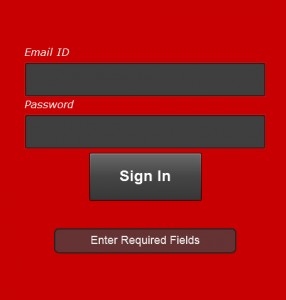
    Toast on AIR for Android

    In the pic above, the text ‘Enter Required Fields’ appears in a ‘Toast’

    (more…)

  • Career++

    Walked into small and big companies in the past, but the day I first entered Adobe, Bangalore, I vowed to myself to enter through the orange doors of my dream company with a valid access card in hand. Glad I was able to do that on 8th November 2010.

    All thanks for Balaji, my senior at college, for referring me to Adobe, Aparna for leading me through the HR formalities seamlessly, Arijit, Ramesh, Harish, Praveen, Radhakrishna and Sourab for the interviews and for taking time off to give clarity on my job description.

    The day of my interviews, I was super-excited with people like Ramesh and Harish – Awesome people whom I unquestionably adore – on the other side of the table. Irrespective of whether I make it into the Evangelism team, or Adobe for that matter, just having a one on one conversation with these people gave me crazy numbers of ideas, opinions and insights. It was indeed an excellent learning opportunity. Interviews, are just not the word !

    As life has its say, my official birthday, October 13th turned out to be the best one ever. On the day, with all formalities completed, I was finally offered to work with the India Evangelism team as a Platform Evangelist .

    This post has been considerably delayed, but better late than never. I am now 2 months into the job, and loving every bit of it, working with an awesome team. How else could it be, working at the Flex Factory !

    With all said, looking forward to dive deeper into the job. The best i could possibly imagine.
  • Mime types for a Flex Server

    Here are a couple of mime-types for a server housing flex apps,
    Most of these maybe already defined by your hosting provider !

    AIR
    Mime-Type : application/vnd.adobe.air-application-installer-package+zip
    Extension : .air

    FXP
    Mime-Type : application/x-zip
    Extension : .fxp
    (more…)

  • Hello World for a Flex Starter

    Here is a Flex Tutorial I’m writing for a couple of my friends. While the Videos on ‘Learn Flex in a week’ and “Test drive Flex in 1 hour” serve as good tutorials, here is an application I have attempted to build, which serves as an example for a developer trying out flex for the first time.

    Get yourself a Flash Builder to start off. A 60-day trial is available here

    The application demonstrates essential implementations like connecting to a WebService, SQLite Database and UI practices, a developer needs to be aware of prior to building a Flex application. This is brought about with 4 components, demonstrating the implementations below,

    1) Displaying Hello World.
    2) Displaying Hello World with a better UI (PopUp) from a XML file.
    3) Displaying Hello World from a Webservice (REST).
    4) Displaying Hello World from a Webservice that pushes data into a SQLite Database.

    (more…)

  • Installing the AIR SDK on Flash Builder

    Here is a set of steps you need to follow to configure a new SDK on Flash Builder 4.

    Download the AIR SDK
    1) The latest SDK can be downloaded from here : http://www.adobe.com/products/air/sdk/
    2) Navigate to /Flash_Builder_Installed_Folder/sdks
    3) Find the folder named ‘4.0.0’ (Our Flex 4 SDK) and make a copy of it in the same location, and name it, ‘4.0.0 AIR’
    4) Extract the contents of the downloaded archive, and paste it inside the ‘4.0.0 AIR’ directory.

    Configuring the new AIR SDK
    1) Right Click on the Project Name in Flash Builder, and select Properties
    2) Select ‘Flex Compiler’
    3) Select ‘Configure Flex SDKs’
    4) In the popup window that opens, Select ‘ADD’ and point to the new SDK you just created, namely ‘4.0.0 AIR’.
    5) Click ‘Ok’
    6) Select ‘Use Specific SDK’, and point to your new SDK.
    7) Click ‘Ok’

    The application should now get complied with the new SDK.

  • A Stint at Open Hack Day 2010

    A long awaiting post, Yahoo! Open Hack Day 2010, Bengaluru. This happens to be my longest stint with coding. For those of you who dont’ know, Open Hack Day is 24 hrs – to build an innovative application on-spot, overnight, with unlimited caffeine and Red Bull’s and glowing laptop’s all around – Not to mention the smell of Geek Air :). Thanks to Twitter, I managed to make it to the 13th Open Hack Day.

    Open Hack India

    If you are wondering why am I bragging about ‘Hacking’, your probably mistaken.

    Hack != Illegal

    (more…)

  • Adobe Flash Platform Summit

    Functional Intent Meets Pixel Perfection, Adobe Flash Platform Summit,2010 – will feature distinct days for developers and designers. You will learn everything from innovations in Flash, Flex, LCDS, LiveCycle, to bringing great experiences to mobile phones and devices, to the future of the platform. You will learn new technologies that enable integrated design and develop workflows, and innovative ways to monetize content. You will take away the skills, insight, and contacts to take advantage of these opportunities as they transform our industry.

    The 2 day event, being the Develop and Design Days, is the largest Flash Platform conference in India with over forty presentations including inspiring keynotes from legendary Adobe speakers. You also have the opportunity to hang out at the expo area and connect with Adobe partners, industry leaders and peer developers and designers. With over 2000 attendees sharing the same passion as you, imagine the opportunities to network and further your goals.

    Get There :
    AFPS web site: http://bit.ly/adobesummit
    AFPS twitter: http://twitter.com/adobesummit

  • Flex – Validate Email Address against the Mail Server

    Here is a small piece of code I wrote to demonstrate Interacting with a Command, through an Event while using a Cairngorm Framework.

    The application connects to a WSDL webservice via Flash Builder 4 Data/Services to validate an Email address against the Email Server. Doesn’t work well with domains with a ‘Catch-All’ email address though !
    (more…)

  • Flash 10.1 performance – Apple VS Android

    Before I start, spend a few seconds going though the links as you come across them.

    The Adobe VS Apple war doesn’t seem to get over. We have seen official websites taking offensive & defensive sides, numerous forums and blogs reasoning their opinion and jokes from presenters at developer conferences (Yes I mean Vic Gundotra at Google I/O 2010). The debate on performance of Flash still seems to be going on and on.

    Focus is now on Android, a scale for judging the correctness of Apple/Adobe. While I dont deny the ultimate browsing experience provided on iPhones/iPads, here is my take on Android running Flash.
    (more…)

  • Flex Cairngorm – Interacting with a Command, through an Event

    Cairngorm is a lightweight micro-architecture framework for Rich Internet Applications built in Flex or AIR, defining best-practices for a RIA. Read More

    When a Cairngorm command requires parameters to call the required delegate, a common (bad) practice is to fetch parameters from View Components / Calculate or Query from inside the Cairngorm Command, and end up writing complicated / un-understandable code inside Command files, when a Cairngorm event is being dispatched from > 1 AS files.

    But isn’t all this going against the very purpose of using the Cairngorm architecture?
    Why not have parameters passed to a Cairngorm Event every time its dispatched, and stay away from mixing C with M and V in a MVC Framework?

    This post explains how you pass parameters to a Cairngorm command at runtime, via a Cairngorm Event.
    (more…)